Skip to main content
Save or Delete entire sales transaction before transaction is closed
Save or Delete entire sales transaction before transaction is closed: (24)
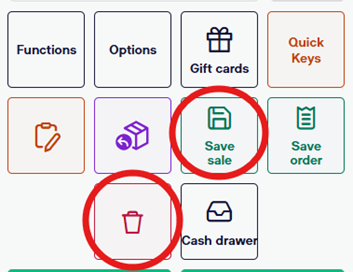
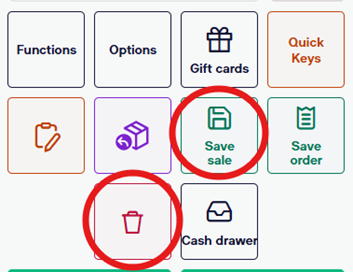
- To delete an entire transaction, simply select the trashcan icon on the bottom right of the sales screen.
- To save a transaction, select the “Save Sale” icon on the bottom right of the sales screen. This will automatically save everything you have scanned, discounted, etc. (Saved sales will be cleared each night)
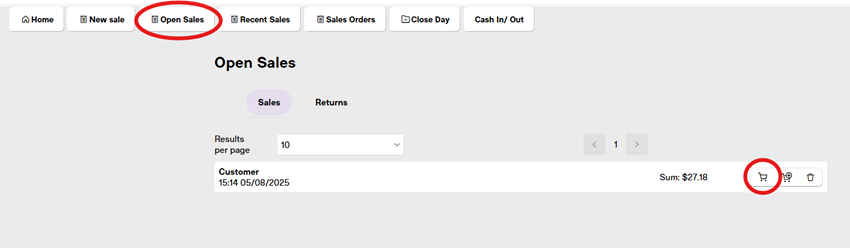
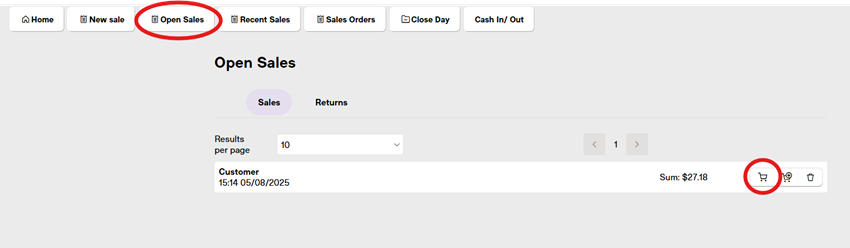
- To retrieve the saved sale, select the “Open Sales” button at the top of the screen. This will show you all of the sales saved from that day.
- Locate the sale you wish to resume and select the small shopping cart on the right side of the line.
- *The second shopping cart with the “+” performs a different function.
- **Also note that there is no prompt for a name to be added to the saved receipt. You will simply locate current open sales and identify the hold by the items scanned.