
Submit a Time-off Request From the Web (Self Service Portal)
This walks through the process of submitting a time-off request from your Paylocity Self-Service Portal on the web verison of Paylocity. As always, if you have any questions, please reach out to HR@mastgeneralstore.com.
- Log in to the Paylocity website at access.paylocity.com.
- Navigate to Self Service Portal from the Menu ☰ .
- Select the Request Time Off button in the Time Off tile.
- Select either PTO or Unpaid Time Off from the Request Type dropdown menu.
Important Info: PTO and Unpaid Time Off will need to be requested separately. For example, if you want to request a Sunday-Sunday off and want 40 hours of PTO that week, you will need to request Unpaid Time off for Sunday-Tuesday, and PTO for Wednesday-Sunday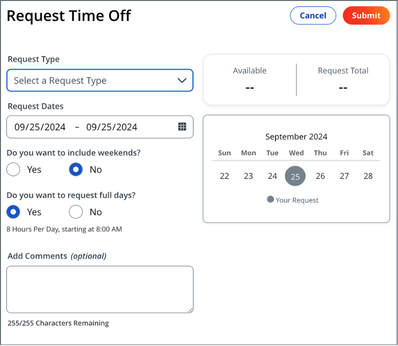
- Select dates in the Request Dates field.
- Select the applicable option for Do you want to include weekends?.
- Select the applicable option for Do you want to request full days?.
If No:- Enter Hours Per Day.
- Enter Start Time.
- Enter additional details in the Add Comments box to provide context.
- Select Submit. After a supervisor approves or declines the request, a message will appear in User Notifications.