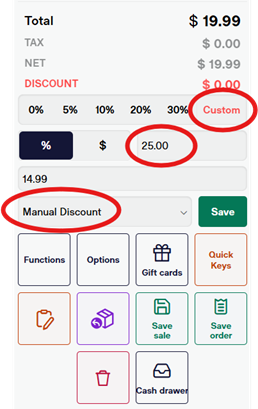
Apply % discount to entire sales transaction: (23)
Navigate over to the right side of the screen directly under where the guest's total is located.
You can select any of the listed percentages offOR enter a custom amount. If you enter a custom amount, make sure to select the “%” icon NOTthe “$” icon. The latter will take a dollar amount off of the total purchase.
Select “Manual Discount” in the drop-down menu beside the “Save” button. Select “Save” to activate the discount.
Important note: Once selected, this function will discount every item scanned at the selected percentage off.