
In Line Editing - Save Search
- Search BAJ : Mast Item Price Update
- Edit this Search
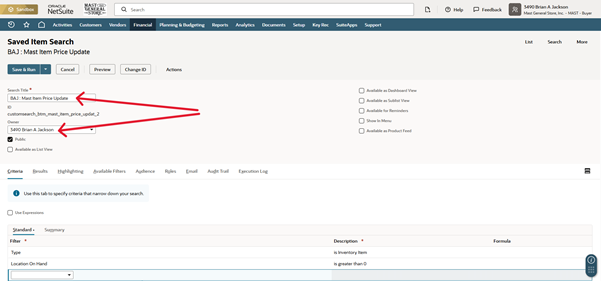
- Change the Name and Owner
- Ex) Search Title: (Your Initials) : Mast Item Price Update
- Set your Criteria
- See Save Searches for setting up Criteria
- Set your Results
- See Save Searches for setting up Results
- Set your Available Filters
- See Save Searches for setting up Available Filters
- Make sure that you have Type selected as one of your filters
- You will need to have Inventory Item selected, once you are filtering your items
WARNING: You may not be able to edit in the saved search if you don’t have this filter selected.
- Once you have set up the Saved Search how you like, click Save & Run
- You should have a Edit Toggle now on the Ribbon at the top of the list, next to the Email icon
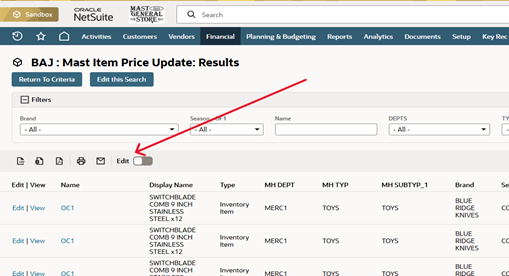
- Toggle the switch and you can now edit items in the Saved Search
- Any column with a pencil next to the Name is editable
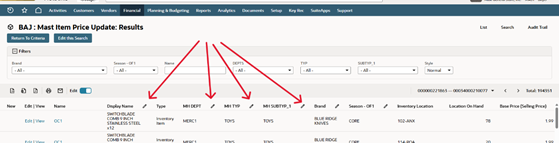
- You should now be able to edit each items attributes
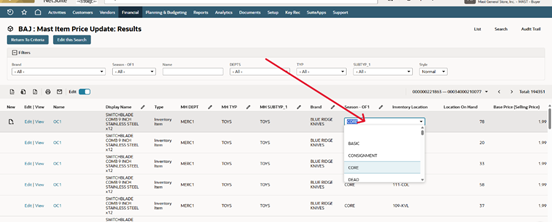
- Once you have edited all items you wish to
Warning: MAKE SURE TO TURN OFF EDIT
- Located at the top of the list